Toggle navigation
Acronis 中文知识库系统
添加
添加
草稿列表
收藏
列表
高级检索
登录
历史
张宏邦
2020-4-16 下午6:21
差异
旧内容
内容
1. Start the command prompt with elevated privileges: Start -> CMD -> Right click -> Run as Administrator 2. Enter the Diskshadow tool interface: C:\Users\administrator> DISKSHADOW 3. Specify that the shadow copies will persist across program exit, reset, or restart: DISKSHADOW> set context persistent 4. Set the verbose output on: DISKSHADOW> set verbose on 5. Start a full backup session: DISKSHADOW> begin backup 6. Specify the volumes to be included in the backup, e.g.: DISKSHADOW> add volume C: alias VolumeC DISKSHADOW> add volume D: alias VolumeD 7. Specify the writers that should be verified during the shadow copy creation: specify the ID of VSS writer(s) from the error message that you receive, e.g for System Writer: DISKSHADOW> writer verify {E8132975-6F93-4464-A53E-1050253AE220} You can find IDs of other VSS writers on the machine by running vssadmin list writers command in the Command prompt 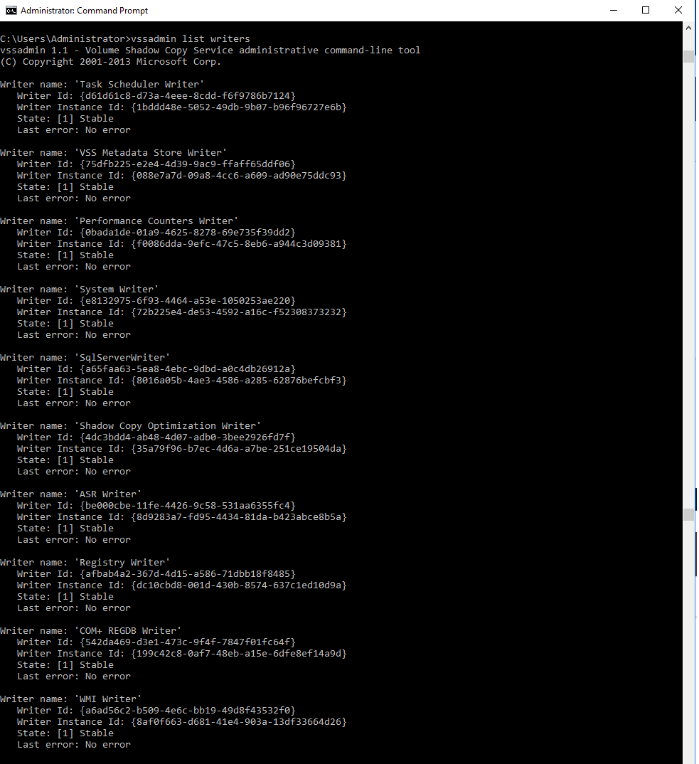 8.After you have specified all volumes and writers for backup, initiate the snapshot creation: DISKSHADOW> create After shadow copy is created, terminate the backup: DISKSHADOW> end backup Exit the Diskshadow tool: DISKSHADOW> exit During backup creation you will see messages similar to the following appearing in the command prompt, meaning that a particular component has been included into backup procedure and will be verified: * Writer "System Writer" is included: + Component is included: \System Files If one of the writers fails, you might see an error message similar to the following: ERROR: The selected writer "SqlServerWriter" is in a faulty state. - Status: 8 (VSS_WS_FAILED_AT_PREPARE_SNAPSHOT) - Writer Failure code: 0x (VSS_E_WRITERERROR_NONRETRYABLE) - Writer ID: {a65faa63-5ea8-4ebc-9dbd-a0c4db26912a} - Instance ID: {8c57ad9a-8055-49e0-96ec-d8b41ea327eb} Error on recent operation. - HRESULT (returned): 80042301 - Error text: VSS_E_BAD_STATE If snapshot is created successfully, you will see a message Number of shadow copies listed: 1 (or more, depending on how many volumes you selected). See example on the screenshot below: 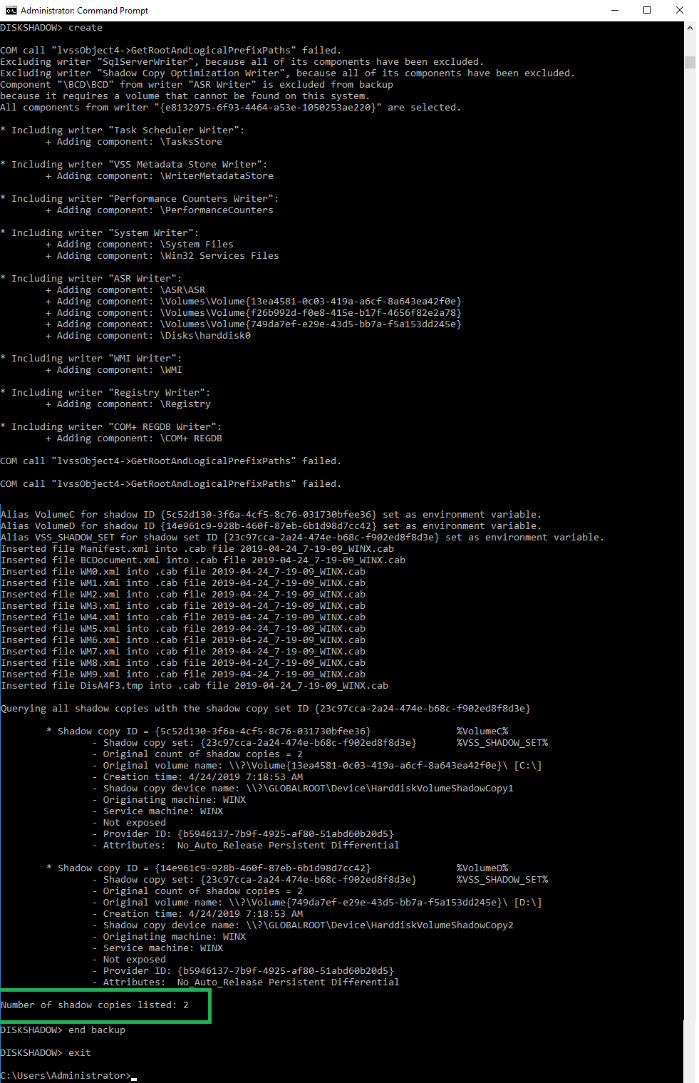 In case there is no such line Diskshadow backup must not be considered as successful.
新内容
内容
1. 以管理员身份启动命令提示符: Start -> CMD -> Right click -> Run as Administrator 1. 进入Diskshadow工具界面: C:\Users\administrator> DISKSHADOW 1. 指定卷影副本将在程序退出、重置或重新启动时持续存在: DISKSHADOW> set context persistent 1. 打开详细输出设置: DISKSHADOW> set verbose on 1. 开始一个完整备份会话 DISKSHADOW> begin backup 1. 指定要包含在备份中的卷,例如: DISKSHADOW> add volume C: alias VolumeC DISKSHADOW> add volume D: alias VolumeD 1. 指定在卷影副本创建期间应验证的Writer:从收到的错误消息中指定 VSS Writer 的ID,例如,针对System Writer DISKSHADOW> writer verify {E8132975-6F93-4464-A53E-1050253AE220} 通过在命令提示符下运行vssadmin list writers命令,可以在计算机上找到其他 VSS Writer的ID。  1. 指定所有卷和写入器进行备份后,启动快照创建: DISKSHADOW> create 创建卷影副本后,终止备份: DISKSHADOW> end backup 退出Diskshadow工具: DISKSHADOW> exit 在创建备份期间,您将在命令提示符下看到与以下消息类似的消息,这意味着备份过程中已包含特定组件 并将对其进行验证: * Writer "System Writer" 包含在: + Component is included: \System Files 如果其中一个 Writer 失败,则您可能会看到类似于以下内容的错误消息 ERROR: The selected writer "SqlServerWriter" is in a faulty state. \- Status: 8 (VSS_WS_FAILED_AT_PREPARE_SNAPSHOT) \- Writer Failure code: 0x (VSS_E_WRITERERROR_NONRETRYABLE) \- Writer ID: {a65faa63-5ea8-4ebc-9dbd-a0c4db26912a} \- Instance ID: {8c57ad9a-8055-49e0-96ec-d8b41ea327eb} Error on recent operation. \- HRESULT (returned): 80042301 \- Error text: VSS_E_BAD_STATE 如果成功创建了快照,您将看到一条消息,列出了卷影副本数:1(或更多,取决于您选择的卷数)。请参见下面的屏幕截图中的示例:  如果没有这样的行,则不应将Diskshadow备份视为成功。
返回
